Key Concepts
- Product - product is the Stock Keeping Unit (SKU)
- Trackable Items - if a product is individually trackable (meaning it’s returnable by the consumers), it’s trackable. Some of the example of trackable items: rechargeable battery for power tool, laptops, restricted substances like tranquilliser.
- Inspection Interval - the maximum interval between each inspection cycle
- Restrictions - the maximum quantity for non-trackable products per consumer account
- Product Value - the current worth of one unit of a product, used to enforce value-based usage limits
Product and Trackable Items
Each product has a dedicated SKU. An example would be T-shirt. A particular T-shirt (e.g. blue stripe) has three SKUs, they are
- Product #1 - size XS
- Product #2 - size M
- Product #3 - size XL
Although they are all the same T-shirt, they are of different SKUs, so they are different products in PPE Vending system.
If a product is trackable, it may have trackable items. Each trackable item has different asset tag (or ID). An example would be Apple MacBook laptops,
- Product #12, MacBook Pro 14-inch A2442
- Trackable Item #1, Asset Tag: COMPANY001
- Trackable Item #2, Asset Tag: COMPANY002
- Product #13, MacBook Pro 16-inch A2485
- Trackable Item #5, Asset Tag: COMPANY004
- Trackable Item #6, Asset Tag: COMPANY005
When Employee John Doe took Trackable Item #1, John will return Trackable Item #1. John could not return Trackable Item #2 when John actually took Trackable Item #3.
For trackable items, we will keep track of the sessions (when did someone take a trackable item, and when did the trackable item get returned).
Product Value
Each product can carry a value. Its purpose is to gate access: it is the input to the value-based usage limits configured on Employee Groups. Before a product is dispensed, PPE Vending adds up the value of what the employee has already taken in the current cycle, and denies the dispense if taking one more would push them past their group’s limit.
Product value also drives the value figures shown on the Transactions page, in the transaction CSV export, and in reporting.
Product Value Is Not a Price Snapshot
PPE Vending stores a product’s value on the product itself, not on each transaction. Transactions record which product was taken and how many; their value is always calculated from the product’s value as it stands right now.
The practical consequence is that changing a product’s value rewrites history. It does not only affect future dispenses. The moment you save a new value, every past transaction of that product is reported at the new value:
- Past reports stop being reproducible. A consumption report you ran last quarter will show different totals if you re-run it after a value change.
- Employees’ current-cycle totals are recalculated at the new value. Raising the value of a product an employee already took this cycle can push them over their group’s limit retroactively, and they may be denied their next item as a result.
This is intentional. Product value expresses what a product is worth to your organisation today, for the purpose of controlling expenditure going forward. It is not an accounting record of what was paid at the time of each dispense, and PPE Vending should not be treated as a system of record for historical cost.
If you need historical value figures to stay fixed, export the transaction CSV before changing a product’s value. If you need to re-price a product without disturbing history, create a new product for the new value and stop stocking the old one.
Because a value change takes effect immediately and across all history, prefer making value changes at the start of a limit cycle, when the disruption to employees’ current-cycle totals is smallest.
Restrictions
To avoid excessive waste, administrators could configure restrictions on products. Each of the restriction rule will be evaluated before dispense to make sure all the rules are not violated before the consumer is granted access.
Multiple restriction rules can be posed on a single product independently. The consumer will not be granted to access the product if any of the rule is violated.
The unit of duration is second, it specifies how long should we look back to calculate the consumption rate. Duration 3600 and Maximum Quantity of 5 means that any consumer could take up to 5 items per 1 hour immediately prior of the current time.
Each of the rule can also be configured to only apply within a calendar day with Daily Reset toggle switched on.
Inspection Interval
Certain products require periodical inspections to either maximize the lifespan or to fulfil its requirements. Some of the examples include,
- headlamp battery might require a full power cycle after 10 uses
- a safety helmet would require sanitization after each use during COVID-19 pandemic
- a controlled substance container would require site manager to acknowledge the quantity after return.
Add a Product
To add a new product (a new SKU) to the system, please follow this procedure,
- Visit Product Settings page
- Click “Add Product” button to open the dialog
- On the popup window, input “Product Name”
- Input product value for further tracking, transaction analysis, and usage limitations (Please note that the currency configuration can be customized in Organization settings to match your local standards.)
- Optionally, you can also specify the photo of the product. This is handy if “Mobile” pickup method enabled in the organization.
- Toggle “Trackable” if the product should be trackable.
- If you want to make the product source information clearer, enter the Manufacturer, Manufacturer Code, Supplier, and Supplier Code
- Toggle “Require inspection after use” and specify “Inspection Interval” if the trackable product requires periodical inspections.
- Assign one or more tags to the product if you want to enable tag-based usage limitation
- Click “Save” button to create the product
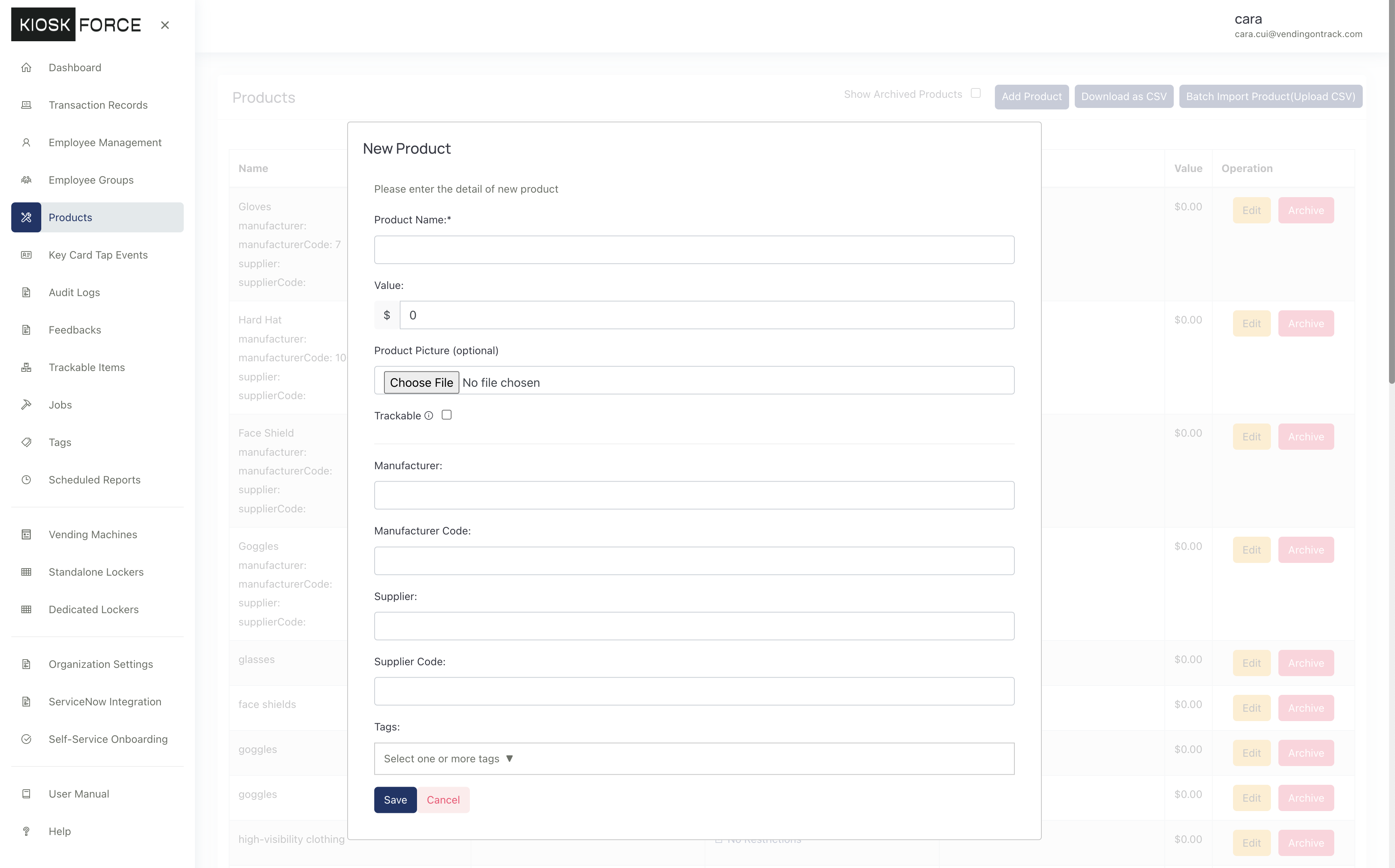
Once created, you should be able to see the product in the Product Settings page.
Update a Product
PPE Vending allows the administrators to perform the following functionalities on the product,
- Add / Update the product name
- Add / Update the product value
- Add / Update / Remove the product photo
- Make a product trackable or non-trackable
- Require inspection after certain uses
- Add / Remove tags on the product
- Add or remove restrictions on products
Update product
To update product, please click Edit button in Operation column on Product Settings page. On the popup window, administrators can update the following attributes,
- Product name
- Product value
- Replace product photo
- Remove existing product photo
- Make the product trackable or non-trackable
- Enter the Manufacturer, Manufacturer Code, Supplier, and Supplier Code to make the product source information clear (Optional)
- Toggle Require Inspection after Use, and specify the number of use cycles between inspections if the trackable product requires periodical inspections
- Assign one or more tags to the product if you want to enable tag-based usage limitation
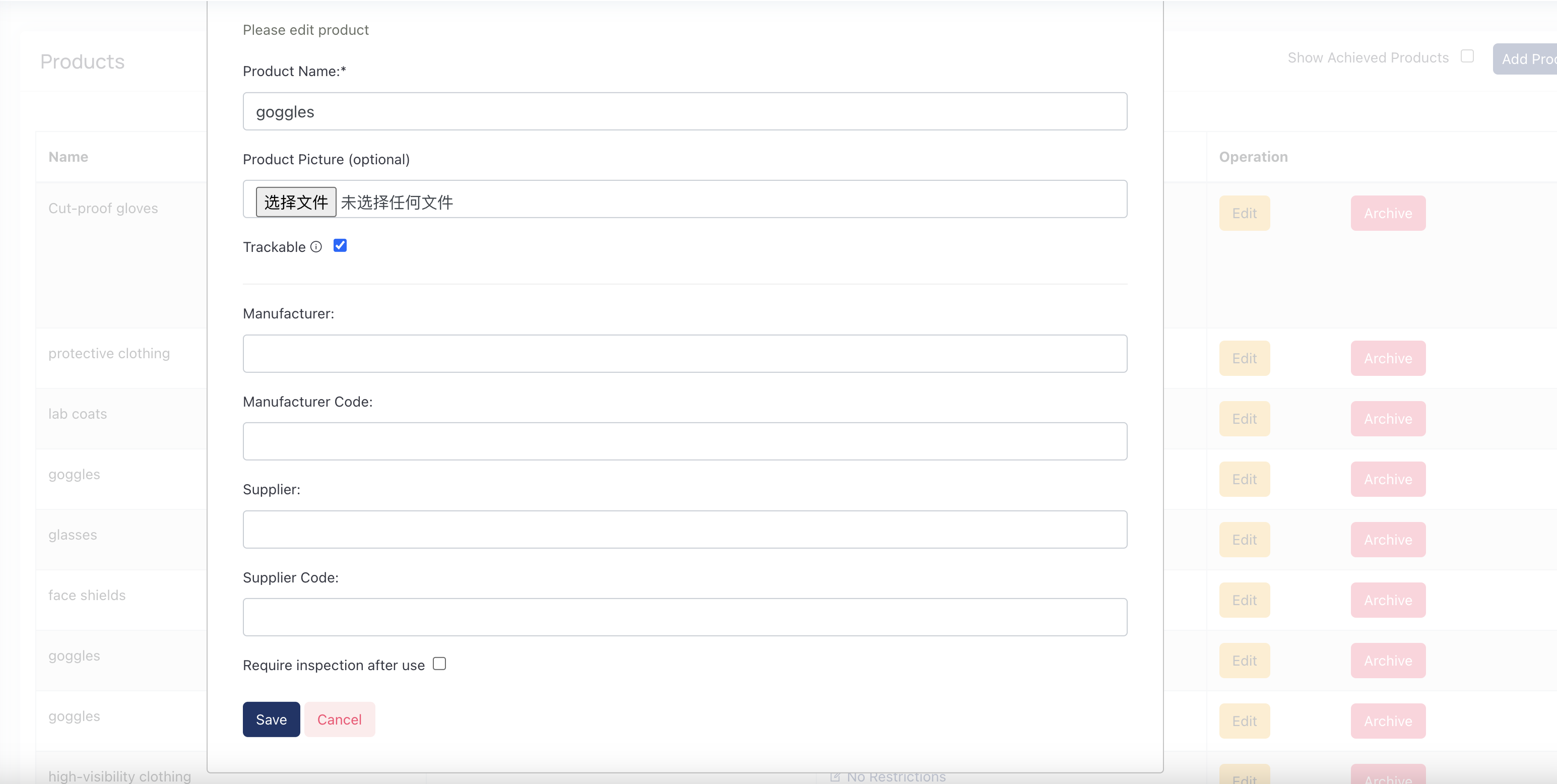
After changing values in the popup window, click Save button to save the option.
Add or remove restrictions
To add or remove restrictions, please follow this procedure,
- Visit Product Settings page
- Find the product and its row in the list
- Click Restricted or No Restrictions link in the Restrictions columns
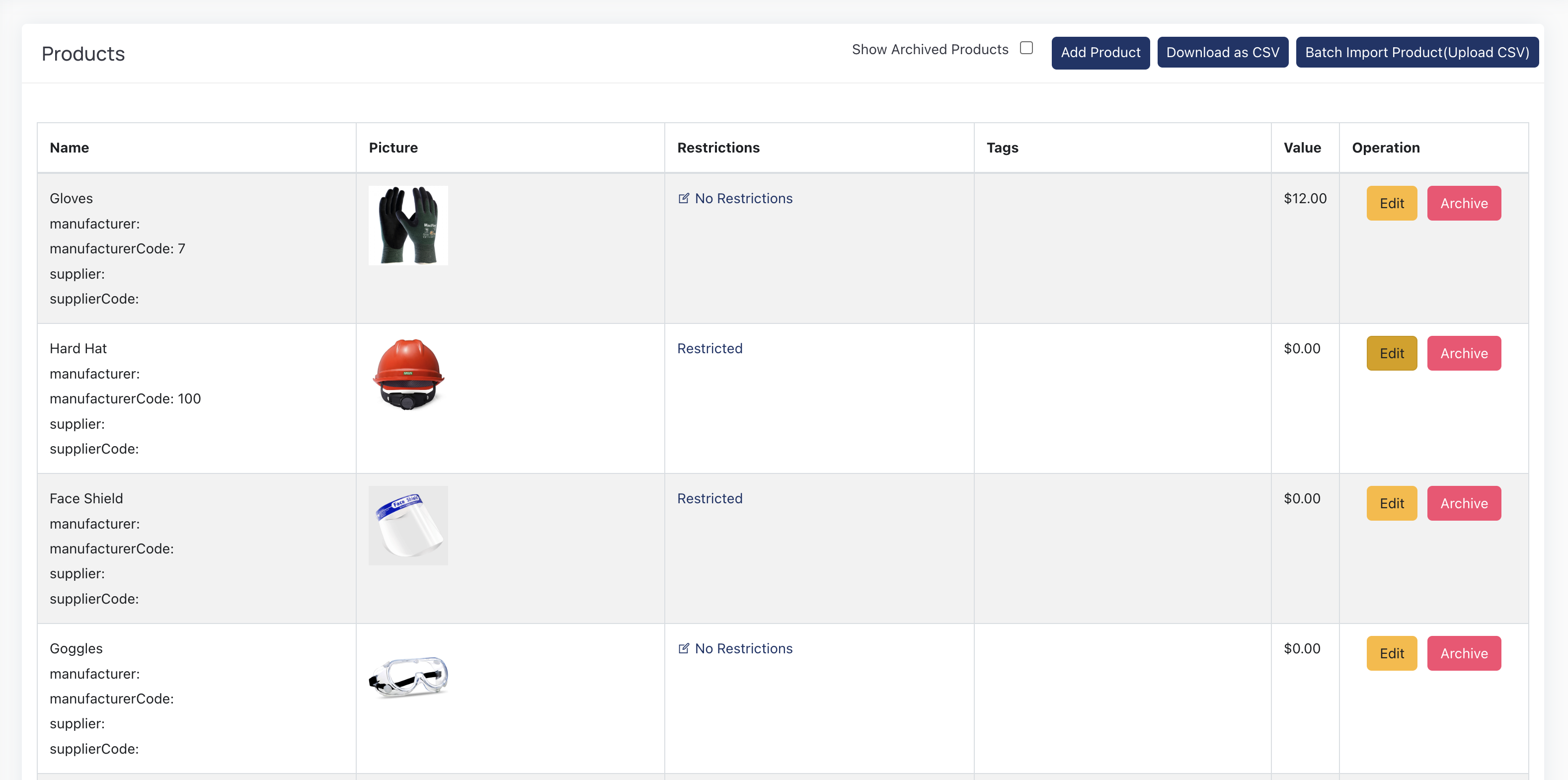
To add a new rule, follow this procedure on Product Restrictions page,
- Click + symbol next to Current Restrictions
- Add the duration of seconds (e.g. 3600)
- Add the maximum quantity a consumer could take (e.g. 5)
- Toggle Daily Reset to refresh the restriction at the start of each new calendar day, regardless of the previous day’s latest transaction time.
- Click Save button to save the restriction.
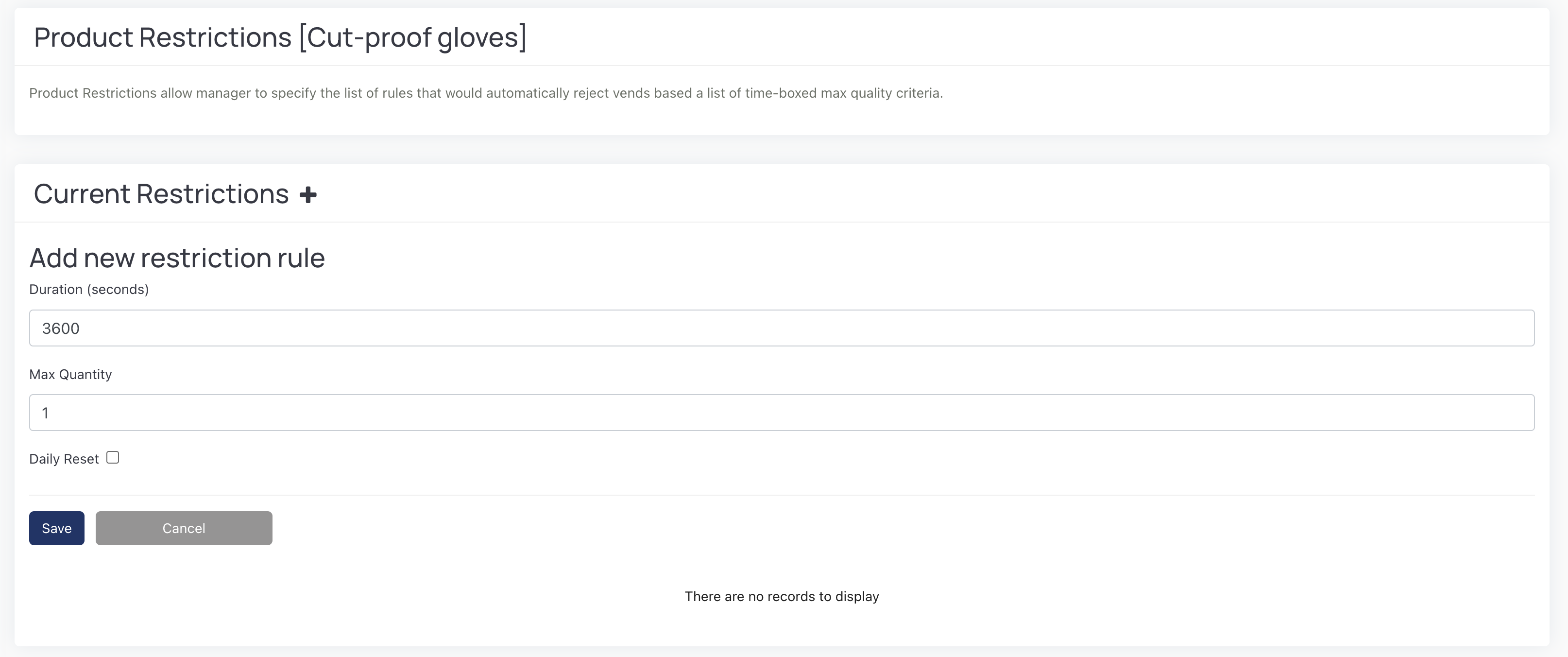
To remove a rule, you could click Delete button on the Actions column. 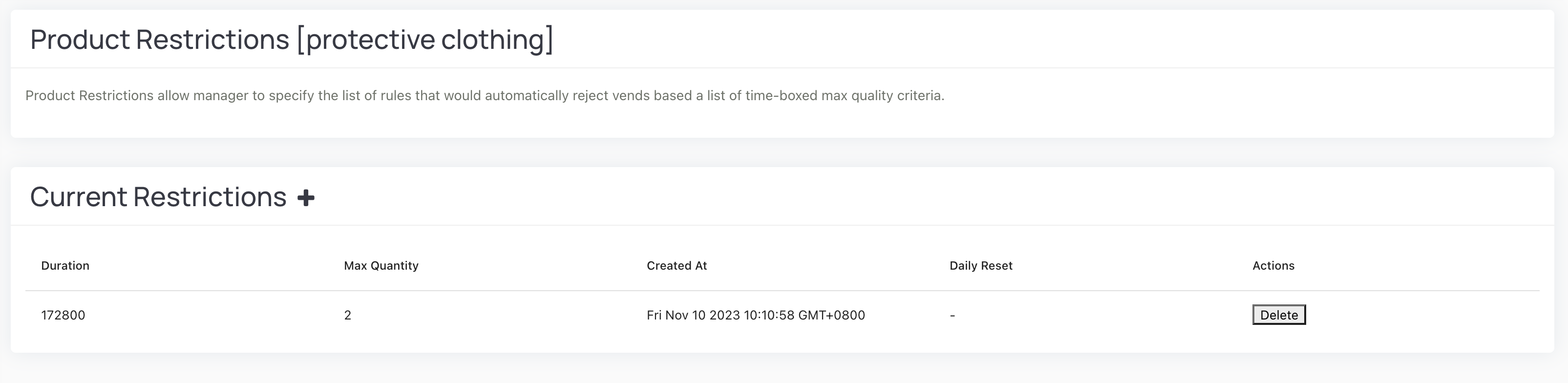
Products Stocked in More Than One Place
When the same product is mapped to more than one coil or cell in a vending machine, the Product Map shows an “Also available at” note next to that product. It lists the other coils where the identical product is stocked (and, where applicable, the quantity available at each). This helps operators see every location a product is held in a machine, so you can refill evenly and avoid emptying one coil while another sits full. No setup is required — the cross-reference appears automatically whenever a product is placed on multiple coils.
Frequently Asked Questions
Q1: What’s the difference between a trackable and non-trackable product?
According to the documentation:
- Non-trackable products: Regular consumable items without individual tracking
- Trackable products: Items that are individually tracked and returnable. The documentation states “if a product is individually trackable (meaning it’s returnable by the consumers), it’s trackable.” Examples include “rechargeable battery for power tool, laptops, restricted substances like tranquilliser.”
Each trackable item has a unique asset tag. For example, when “Employee John Doe took Trackable Item #1, John will return Trackable Item #1. John could not return Trackable Item #2 when John actually took Trackable Item #3.”
Q2: How does the Daily Reset toggle work for restrictions?
The Daily Reset feature is documented in the restriction rules section. When enabled, it will “refresh the restriction at the start of each new calendar day, regardless of the previous day’s latest transaction time.” This means:
- With Daily Reset OFF: The duration counts from each transaction backwards
- With Daily Reset ON: The restriction resets at midnight each day
Q3: What do the duration and maximum quantity mean in restriction rules?
As explained in the documentation: “The unit of duration is second, it specifies how long should we look back to calculate the consumption rate. Duration 3600 and Maximum Quantity of 5 means that any consumer could take up to 5 items per 1 hour immediately prior of the current time.” Multiple restriction rules can be applied independently, and “The consumer will not be granted to access the product if any of the rule is violated.”
Q4: What are the Manufacturer, Manufacturer Code, Supplier, and Supplier Code fields used for?
The documentation states these fields are used “to make the product source information clearer.” They are optional fields that can be entered when adding or editing a product. These fields help track the origin and supply chain information for products in your inventory system.
Q5: If I change a product’s value, what happens to transactions that already took place?
They are re-reported at the new value. Product value is stored on the product, not copied onto each transaction, so a transaction’s value is always computed from the product’s current value. Changing the value therefore changes the reported value of every past transaction of that product, and recalculates employees’ current-cycle totals against their group limits. See Product Value Is Not a Price Snapshot. If you need the old figures preserved, export the transaction CSV first.
Q6: When should I use the “Require inspection after use” feature?
The documentation explains this feature is for trackable products that need “periodical inspections to either maximize the lifespan or to fulfil its requirements.” Examples provided include:
- “headlamp battery might require a full power cycle after 10 uses”
- “a safety helmet would require sanitization after each use during COVID-19 pandemic”
- “a controlled substance container would require site manager to acknowledge the quantity after return”
You specify the “Inspection Interval” to set the number of use cycles between required inspections.